


Mail Copied - guna333@live.com


TechAdvisor | Caterpillar
TechAdvisor | Caterpillar
A global application for dealers transforming technical complexity into clear, customer-ready recommendations.
B2B
Automobile & heavy machinery
0->1
Research Heavy
End to end

Role
Lead UI/UX Designer
Timeline
8 Months
Jan 2025 - Aug 2025
Team
1 Designer, 1 Researcher,
5 developers, 1 PO, 1 Architect
Skills
User experience, Visual Design, Research, Concepts, Interaction design, UX Strategy.
Tools





The case study is optmized for web view. Kindly access it on a larger screen.

TLDR
TLDR
Got just a minute?
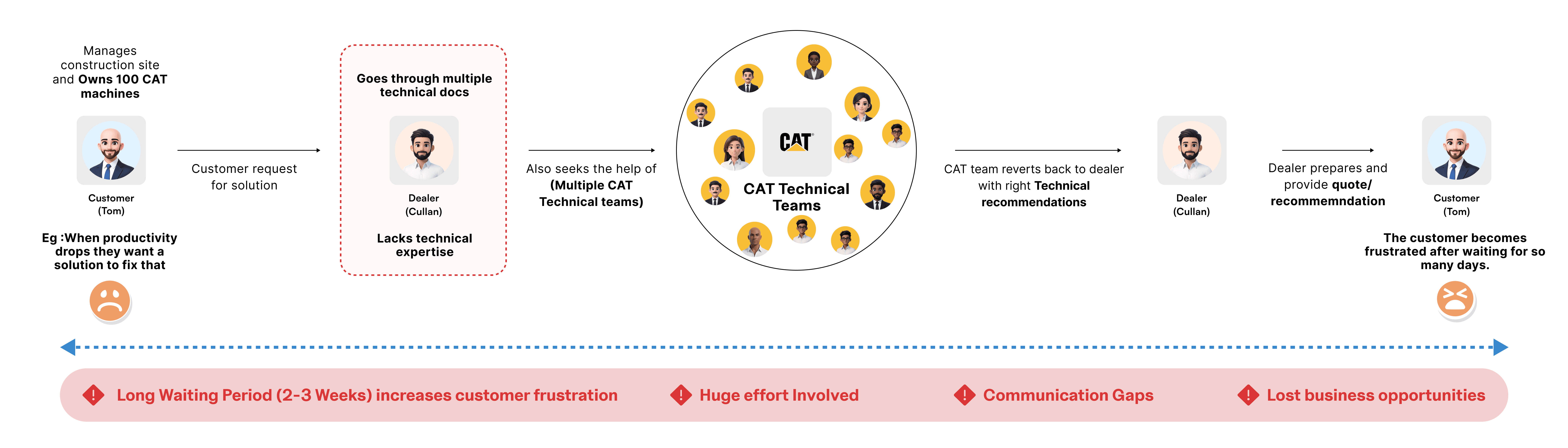
A customer calls his CAT dealer. He runs a site with 100 machines, productivity has dipped, and he wants to know which technology will fix it. The sales rep doesn't have the answer, he digs through technical docs, loops in three CAT technical teams, and promises to get back. By the time a quote arrives 2–3 weeks later, the opportunity is already lost.
When I got the brief, it seemed like a straightforward recommendation tool. But research revealed a different challenge: dealers didn't need another tool they needed a way to answer customer questions within 30 minutes, before the customer hung up or moved on.
Outcome & Impact
< 1 min
to reach a recommendation
60%
More deals acquired
85/100
Score achieved in sus
Problem
Dealers struggled to confidently recommend technology due to fragmented information, complex configurations, and reliance on experts slowing decisions and increasing errors.
What I did
I led the end-to-end UX shaping the recommendation strategy, translating constraints into design decisions, and designing a scalable experience in close collaboration with Product, Engineering, Stakeholders and SME's.
Context
What was it about?
What is the project about
This was a 0→1 product initiative delivered in two strategic phases, covering the entire product lifecycle from discovery and research to design, validation, and delivery.
What is TechAdvisor
TechAdvisor is a smart, centralized platform designed to help dealers and customers discover, understand, and get capability recommendations for Caterpillar asset.
In a Nutshell
TechAdvisor is a trusted co-pilot for technology queries.
Why - The problem
Every recommendation took four hand-offs and three weeks
Caterpillar offers a growing portfolio of digital solutions and machine technologies. While these technologies deliver strong value to customers, dealer teams struggle to confidently recommend, configure, and support them.
Problem scenario
The challenge
Make expert knowledge dealer ready
“To transform an expert-driven process into a dealer-ready recommendation experience that is fast, explainable, and scalable, reducing coordination dependency and enabling confident- recommendations, so dealers can move from
weeks-to-minutes decision making.”
Reducing dependency on specialist and long internal coordination cycles
Easy for dealers to digest the recommendtions data
recommend the right technology with confidence
Enabling data-driven foresight to support smarter and faster decision-making.

Initial discovery
We studied how recommendations happen today
User Interviews
I worked closely with our UX researcher and we conducted discovery sessions with users across Western Australia and the US. The goal was to understand the real shape of the problem before designing anything.
The Goal
Instead of asking "what features do you want?" we focused on how recommendations were made today, what steps caused delays, and where users hesitated or escalated to experts.






Current as is Customer journey

Insights - What we studied from the users
The goal was simple: answer customers before they moved on.
What did every interview point back to?
Dealers don't think in products, they think in problems and they need answers quickly before the customer hangs up.

The reframe
The moment the problem changed shape
What we Assumed Before
A technology recommendation tool for dealers
Help dealers browse caterpillar's technology catalog and configure the right setup for the customers.
What we understood that users wanted
A confidence tool for a 30-minute decision window
Help dealers say the right answers out loud on a live call, without waiting on specialists.
From Insights to Concepts
The concept direction
Our goal in concept design was not to create a perfect system, but to design a flow that remove hesitation for users at the moment of decision making. Some of our core goals are:
Focus 01
Help dealers quickly reach a recommendation.
Focus 02
Explain why a recommendation makes sense.
Focus 03
Reduce the need for expert escalation.
Final concepts (Scroll to view)




Concept testing - What we learned
The direction was right but the users pushed us further
Why test again after several interviews?
Interviews gave us the understanding of the problem, but users had nothing concrete to react to. Concepts changed that now we could check whether our direction was right, watch how dealers actually hunt for technical information during a cross-sell or upsell, and see where their current tools fall short.
We tested the concepts with the same set of users who we did interviews with.


The Plan vs The reality
The story shape
The plan
Single asset first as the foundation, multi-asset on top. Helios looked feasible then, so multi-asset was going to work exactly like single asset: a dealer searches, the system pulls the fleet of one customer/one product family/one machine modal/ prefix. One interaction model, two scales.
What is Helios?
Helios is a technology which helps the project to pull all the assets data directly from different sources.
The ground moves
The ground moves. Helios came back as a 12–18 month implementation. The multi-asset entry point depended on it.

The Pivot
We changed the door, not the house. Fleets come in by import instead of search. Everything after the entry point capability selection, recommendation structure, card patterns, was already built on the single-asset foundation, so none of it had to change. And when Helios lands, search can be added as a second door with no redesign.
Defining the MVP
Single asset first, multi-asset on top
Concept testing gave us the direction; phase 2 was about sequencing it. We built single asset first — not as a smaller version of the product, but as the foundation: the card patterns, the state indicators, the recommendation structure everything else would inherit. Multi-asset would layer on top, using the same interaction model at fleet scale.

Focus 01

Single Asset Recommendations
Designed as the foundation of trust, clarity and for scalability.
Focus 02

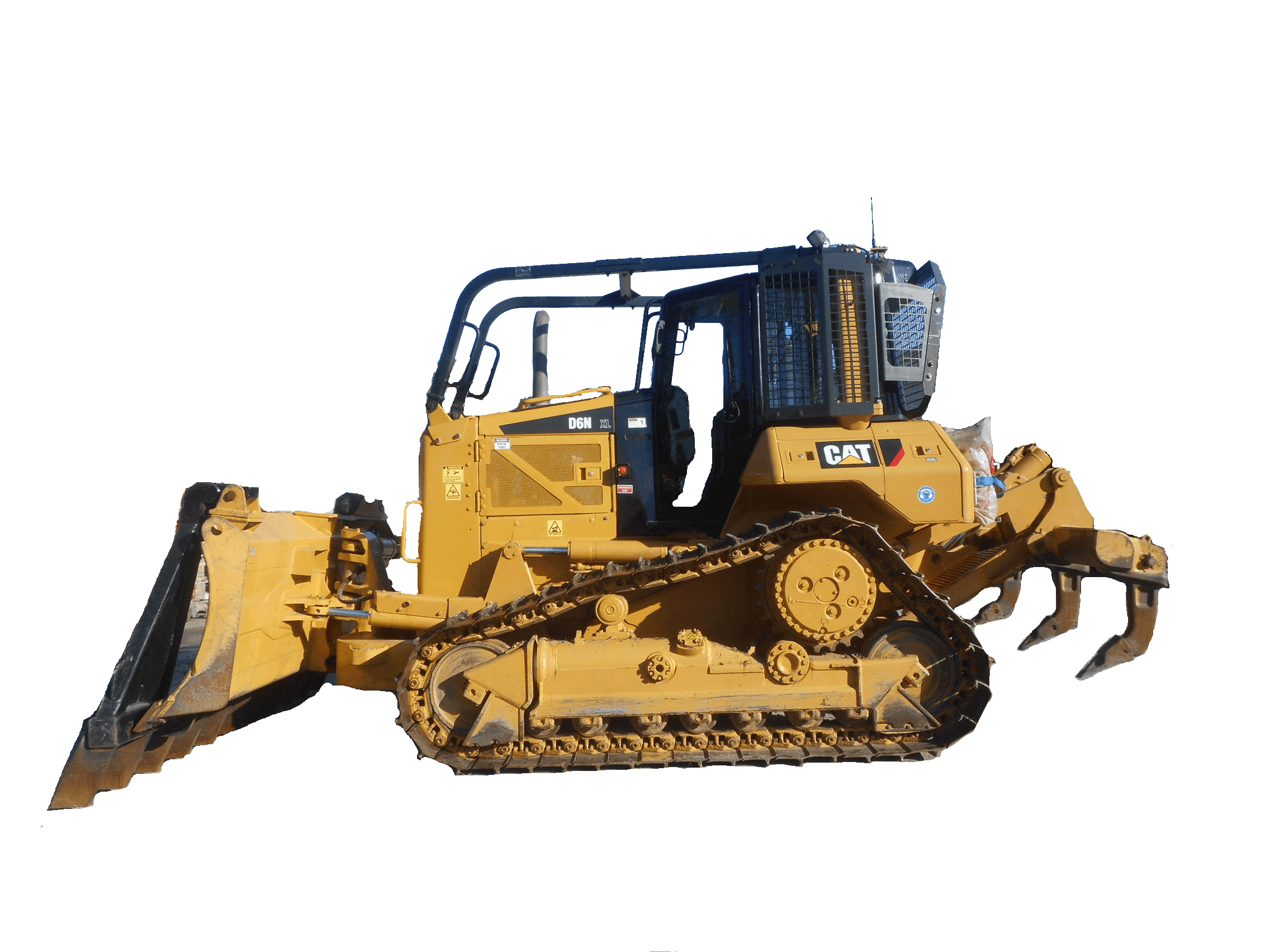
Multi-Asset Recommendations
Designed for real-world dealer workflows, where recommendations are rarely made for one machine at a time.
The critical decision
The dependency that changed our entry point
The plan
Multi-asset would work like single asset: search for assets, get recommendations. Helios integration made that possible.
What changed?
Helios came back as a 12–16 month implementation. Our entry point for the entire fleet experience sat behind it.
The Call
Ship the door we could build now. Dealers import a group via Excel instead of searching for it.
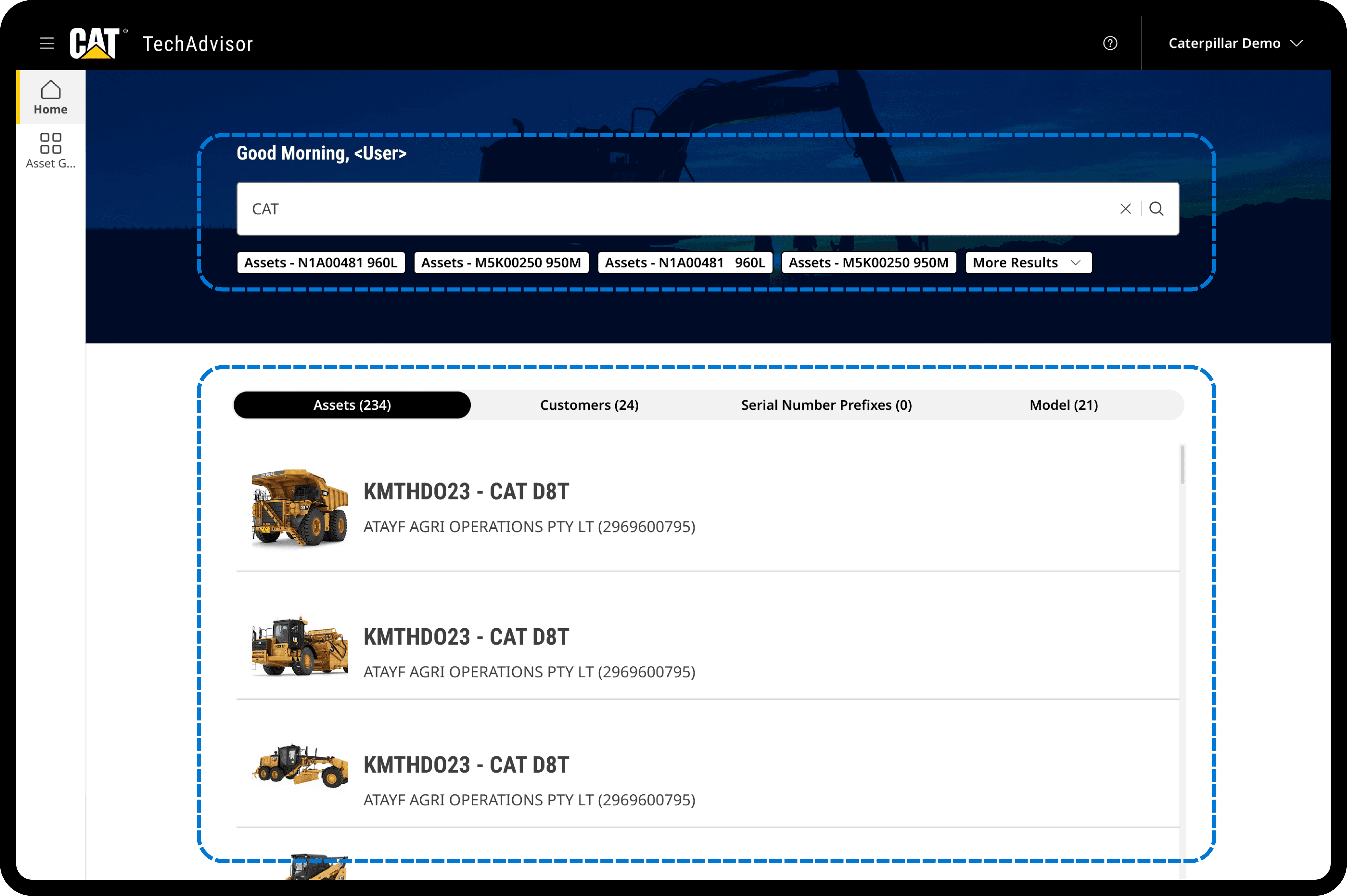
Initial direction: Which was pushed back
Search-based approach

Final decision: Shipped
Import-based approach
Why not just wait for Helios?
Waiting meant shipping nothing for over a year while dealers had needs right now. Import was the less elegant door, but it opened immediately and because everything behind it was already built on single-asset patterns, search can be added later without a redesign.
Only the entry point changed. The foundation stayed the same.
Key Iteration
Iterating on import: familiar pattern vs fewer clicks
We explored a minimal approach where the import process was compressed into fewer screens reducing the perceived effort of getting assets into the system before making recommendations.

Rejected — fewer steps
Compressed import
The whole import on one screen, minimal clicks, fastest possible entry.
Fewer clicks, but it broke the upload pattern users knew from every other CAT application. Unfamiliar means hesitation, errors and a new learning curve.

Shipped — stepper-based flow
Familiar pattern
Guided steps that match the upload pattern used across the CAT ecosystem.
More steps, but users could predict the next move. Predictability neat saving two clicks.
Constrains
The edge cases that almost broke the flow
Max 200 assets in a group
Max 200 assets in a group
The Limit
Imports cap at 200 assets per group, and some rows still fail validation, so a "200 asset group" is often fever.
Why it hurt
Dealers with larger fleets may not understand what made it in and what didn't until a recommendation run came back.
The fix
A validation runs before import, splitting accepted and rejected assets with a reason against each row.

One product family per run
One product family per run
The Limit
Recommendations generate for one product family at a time, so 200 assets across 7–8 families is never one output.
Why it hurt
Users will expect a single run and would have hit the split midway through.
The fix
A product-family filter appears before generation, making each run a deliberate choice instead of a surprise.

Solution
The new experience
01 - Discovery & Current state

Insight
Need a advanced way to search the assets and I can't recommend anything until I know exactly what this machine already has and today, finding that out takes longer than the customer call itself.
Customer specific asset specs must be shown upfront.
Decision: How do dealers discover the assets and understand the current state?
We designed a fast, intelligent entry flow that helps users quickly find the right asset and understand its current state before exploring recommendations. Deeper technical details are available on demand via a side drawer, ensuring users have the right context before making upgrade decisions.
Impact → Dealers reach the right asset and its full technology state in secondssset posses.


02 - Asset Import - Multi Asset
Insight
Recommendations are never for one machine, my customers runs a fleet, going asset by asset just isn't realistic.
Fleet level recommendations are he real world use cases.
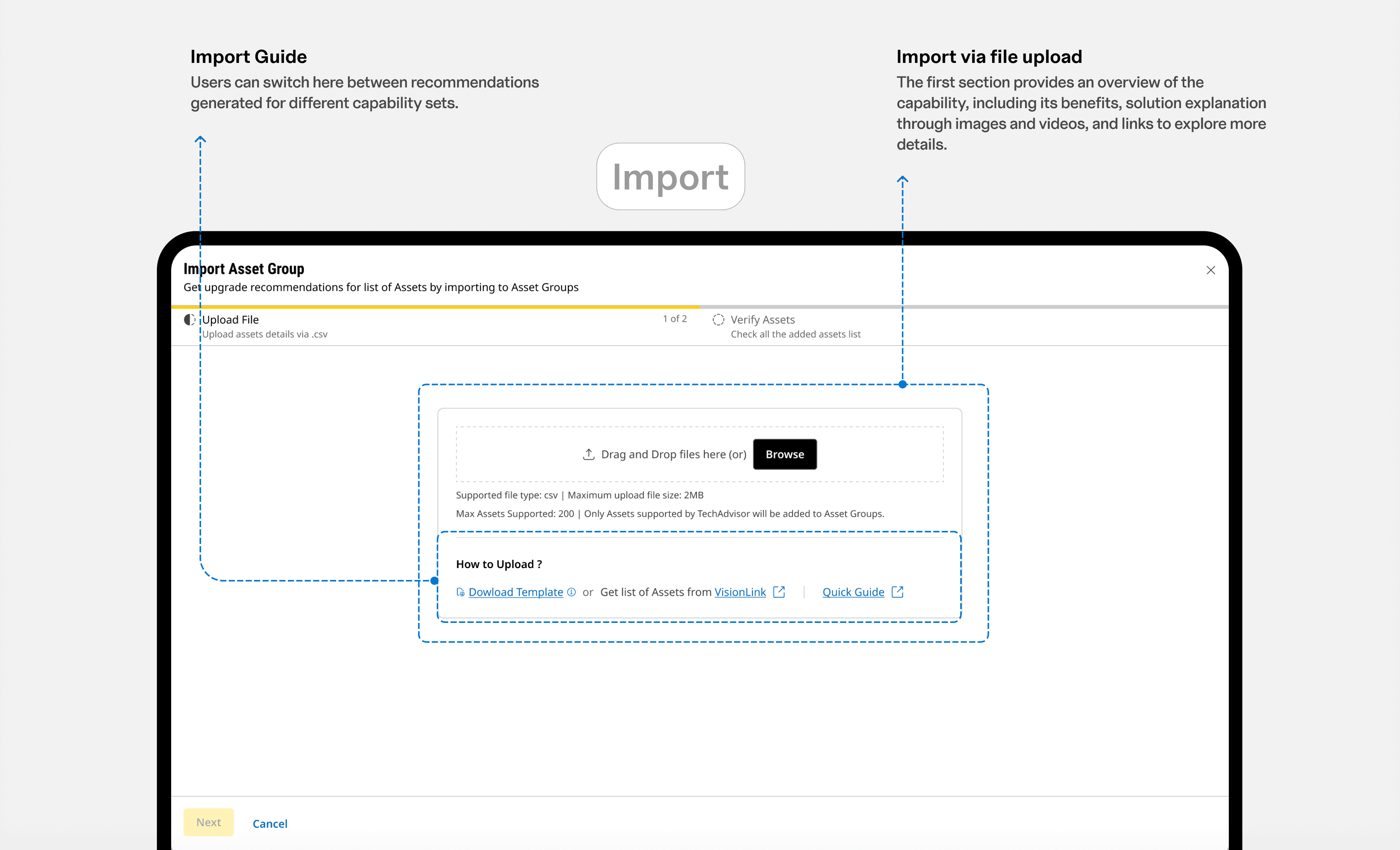
Decision 1: How do dealers import assets for multi asset recommendations?
Fleet recommendations begin with an import, not a hunt. Users download a ready-made Excel template, drop in their asset list, and a validation layer checks every row before anything enters the system accepted and rejected assets are split out with reasons, so bad data gets fixed at the door instead of breaking a recommendation run downstream.
Impact → Getting a 200-asset fleet into the system became a minutes-long task, with errors caught upfront instead of discovered after.


Decision 2: How do dealers manage assets when imported as groups?
Every import lands as a named asset group showing its created date, processing status, and last-processed time at a glance. Users open any group to view its assets, watch processing complete, and generate recommendations the moment a group turns ready no re-imports, no asking around.
Impact → One list answers "where is my fleet, and is it ready?" — full traceability from upload to recommendation.


03 - Selecting right capabilities

Insight
I'm overwhelmed by the capabilities the CAT offers and they are swamped by sea of solutions. I have no clear picture what to pick for the right customer problem in that quick span of time.
Dealers asked for use case guidance, not products lists
Decision 1: How users seamlessly selected capabilities?
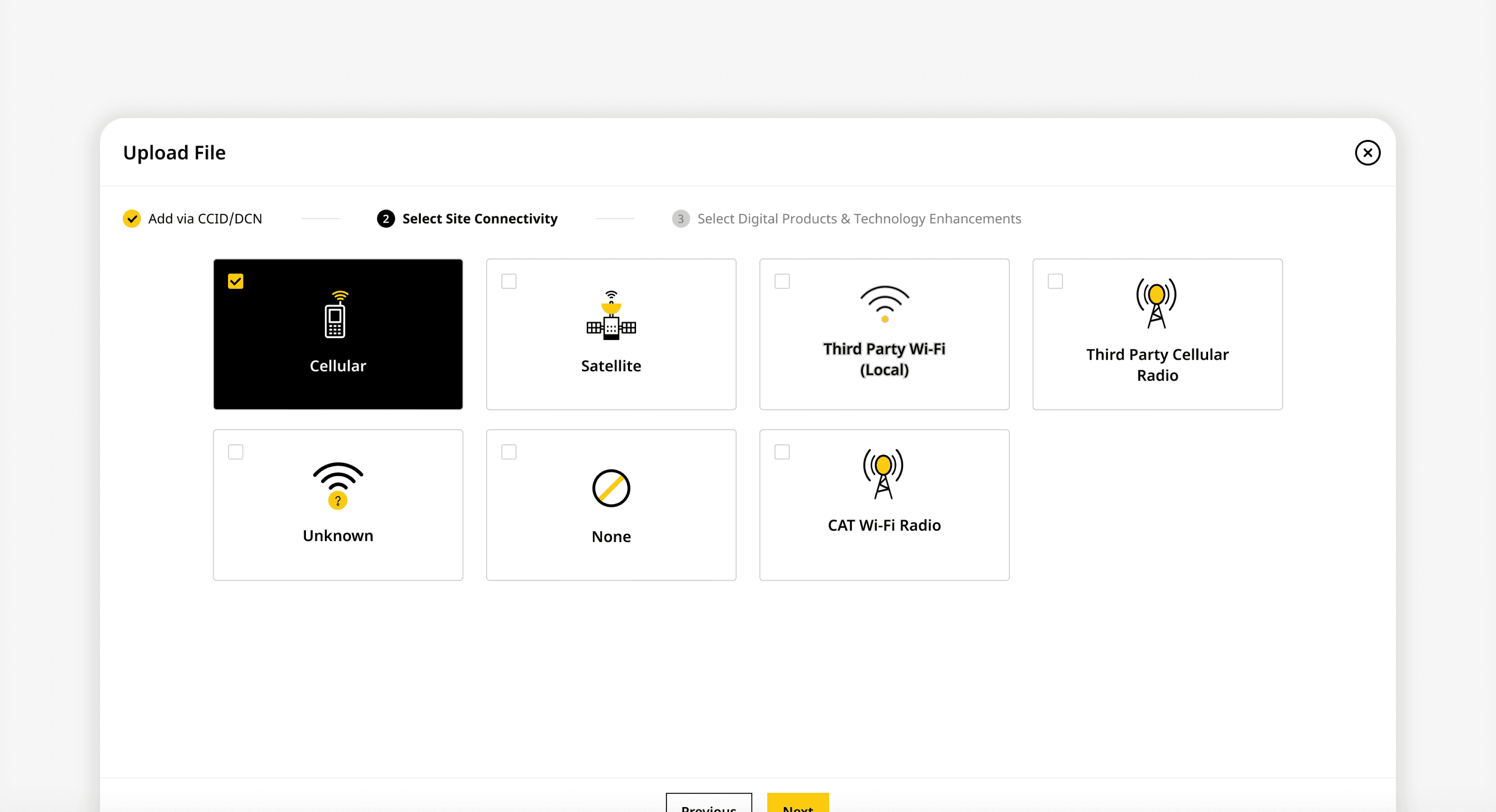
Capabilities appear as cards grouped by use case, customer problems, not product names. The system auto-detects site connectivity and pre-selects what the asset supports, and every card carries a visual state indicator separating what's already active, what's available, and what can be enabled.
Impact → Users skim, scan, and shortlist from the full CAT catalogue without expert help and the available-vs-added confusion from testing disappeared.


Decision 2: How users evaluated capabilities?
Evaluation needed to support two speeds. A quick view opens any capability's benefits and recommendations in a modal, no waiting, no generating, no page loads. When the choice is close, users pull options into a side-by-side comparison to see exactly how capabilities differ before committing to one.
Impact → Faster decisions with less cognitive load.


Decision 3: How we scaled this for multi assets?
The multi-asset capabilities screen deliberately reuses the single-asset design, same cards, same layout, zero re-learning. Only the essentials change: connectivity is selected manually (since it can't be auto-detected across multiple assets), the context reflects the selected asset group, and recommendations remain single-select to keep each generation clear and unambiguous.
Impact → Users carried their mental model straight from one machine to 200, fleet capability without a second learning curve.

04 - Recommendations
Insight
Getting recommendations isn't the finish line, I still have to understand quickly and also I have to explain it to the customers in words that makes sense to them.
Concept testing showed recommendations need stromger context, not just actions.
Decision 1: How dealers easily consume the recommendation output
For a single asset, users can review recommendations alongside asset details. Capabilities are organized in the left navigation for quick access, while recommendation use cases are grouped into accordions to progressively reveal details. An overview summarizes each capability and its key benefits, and users can edit recommendations before implementation. Actionable recommendations are highlighted with icons for quicker interpretation.
Impact → Recommendations stopped being expert output to decode, they became customer-ready material a dealer can walk through live.


Decision 2:
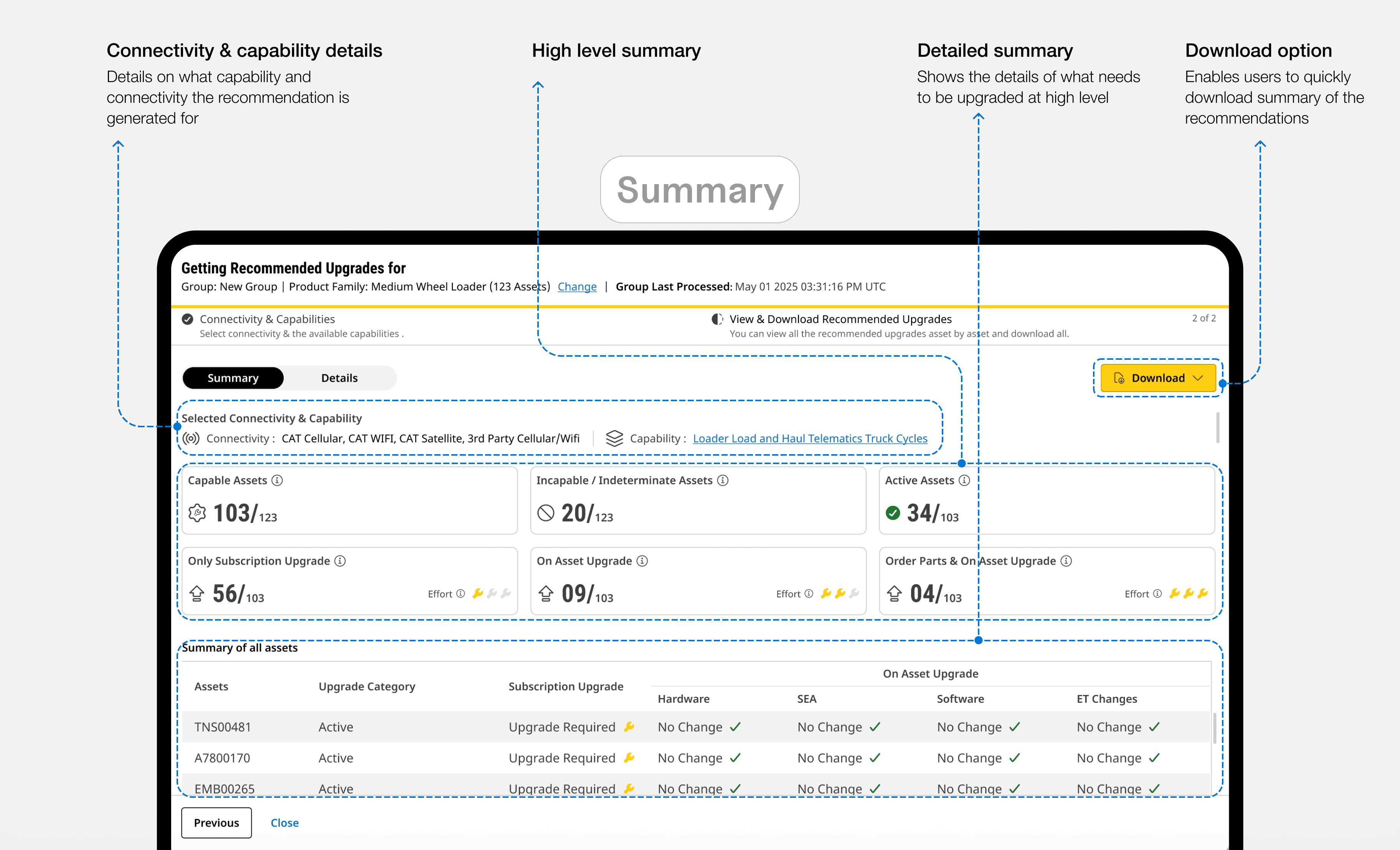
How dealers can consume the recommendations for multi assets
Fleet recommendation output leads with a high-level summary: capable, incompatible, and active assets at a glance, with every upgrade category quantified across the group. A detailed view then breaks down exactly what each asset needs subscription, hardware, software and the whole thing downloads as a single package for the customer conversation.
Impact → A 123-asset recommendation run reads in one screen: scan the totals, drill into any asset, hand the customer a number.


Design validation
We validated three ways - Users, effort and experts
85/100
System Usability Scale
10 statements, rated by users after running the real flows.
Scored 85 against an industry average of 68 Grade A, in the top 10% of systems tested.
6/7
Task level effort rating
Users rated each core task from very difficult (1) to very easy (7).
Averaged 6 across discovery, import, capability selection, and recommendations. Import scored lowest, it carries the constraints we couldn't design away.
The flows didn't cost users effort.
87/100
Expert review
HFI evaluation model Reviewed by usability experts across navigation, content, presentation, and interaction.
Scored 87. Presentation and navigation led; content scored lowest on terminology density.
The craft held up to scrutiny.
Impact
A three-week relay became a conversation that ends on the same call
What changed in the dealer's journey
Weeks → Minutes
Time to a customer ready recommendation
Against the 2-3 week baseline mapped in discovery.
4 → 0
Hand-offs to CAT technical teams
The dealer completes the recommendation without escalation.
1 → 200
Assets per recommendation run
Fleet-scale recommendations, previously impossible.
Business Impact
📈 Faster recommendations → opportunities converted before the customer moves on
📉 Fewer escalations → CAT technical teams freed from routine dealer requests
📈 Fleet-scale runs → larger deals, previously impractical
📉 Explainable, consistent output → fewer configuration errors and support tickets
What it means?
The knowledge already existed. Access didn't. Every answer sat behind multiple teams and handoffs. By putting expert reasoning where dealers already worked, a 2–3 week process became a conversation that could end on the same call.
Reflections from the journey
Sequencing is a design decision
Choosing single asset first was about shipping something solid. Then Helios came back as a 12–16 month implementation and the multi-asset entry point collapsed. Only the door had to change — everything behind it already sat on single-asset patterns. I'd made a scalability decision months before I knew I'd need it, and I now make that decision deliberately rather than by instinct.
Research changed the product, not the interface
The brief asked for a recommendation tool, and we'd sketched a capability catalogue. Seven interviews later the real need was confidence inside a 30-minute decision window, a different product with a different measure of success. We'd have built a good catalogue that nobody could use on a live call.
Final Thoughts
Nearly every meaningful decision on this project was made against something I couldn't remove, a 12–16 month dependency, a 200-asset ceiling, an engineering effort budget. What I took from it is that constraints don't dilute design work, they're what make design decisions legible. The version of TechAdvisor that shipped is the version that could ship, and I can defend every trade-off that got it there.
Thanks for reading my case study!
If you have any more questions or want to know more details, please don't hesitate to contact me. For now, please consider checking my other work, my experiments, or learn more about me.
Next case study

PMRS
Streamlining Data load and Reporting Operations for Unilever's Data & Analytics team.
Enterprise
FMCG
Enterprise
Automobile & heavy machinery
0->1
Dealers were quoting million dollar machines from memory. We fixed that.
Fun fact

Design That Serves Business and Users
AI Network Optimizer
Designed an AI-powered logistics planning tool to unlock cost efficiency across India’s supply chain for Unilever.
Enterprise
Logistics
AI
FMCG
0->1
